Let the AI you already use read your records.
Connect Claude, ChatGPT, Cursor, or any MCP app to Decis, or use the Decis CLI in your terminal. Your AI reads your sleep, heart rate and HRV, workouts, meals, and calendar and answers from your own numbers. Read-only, and you can disconnect at any time.
https://www.decis.me/mcp- Read-only: no tool can change or delete records
- Sign in and approve on Decis's own consent screen
- Free plan: 500 data reads a month
What you can ask
Ask in plain words. Your AI finds which records you have, reads only what the question needs, and says what the data covers and what is missing.
- Sleep“What disturbed my sleep most this month?”
- Recovery“Should I train hard or rest today?”
- Meals“Do late dinners change how I sleep?”
- Schedule“Do meeting-heavy days hurt my sleep?”
Before you start
- A Decis account. The free plan includes 500 data reads a month.
- At least one connected source: Apple Health (through the Decis iOS app), Google Health, WHOOP, or Google Calendar.
- An app that supports remote MCP servers, or a Mac or Linux terminal for the CLI.
Connect your app
Every app connects to the same address and signs in through your browser. You see what will be read before you allow it.
https://www.decis.me/mcpClaudeweb · desktop · mobile
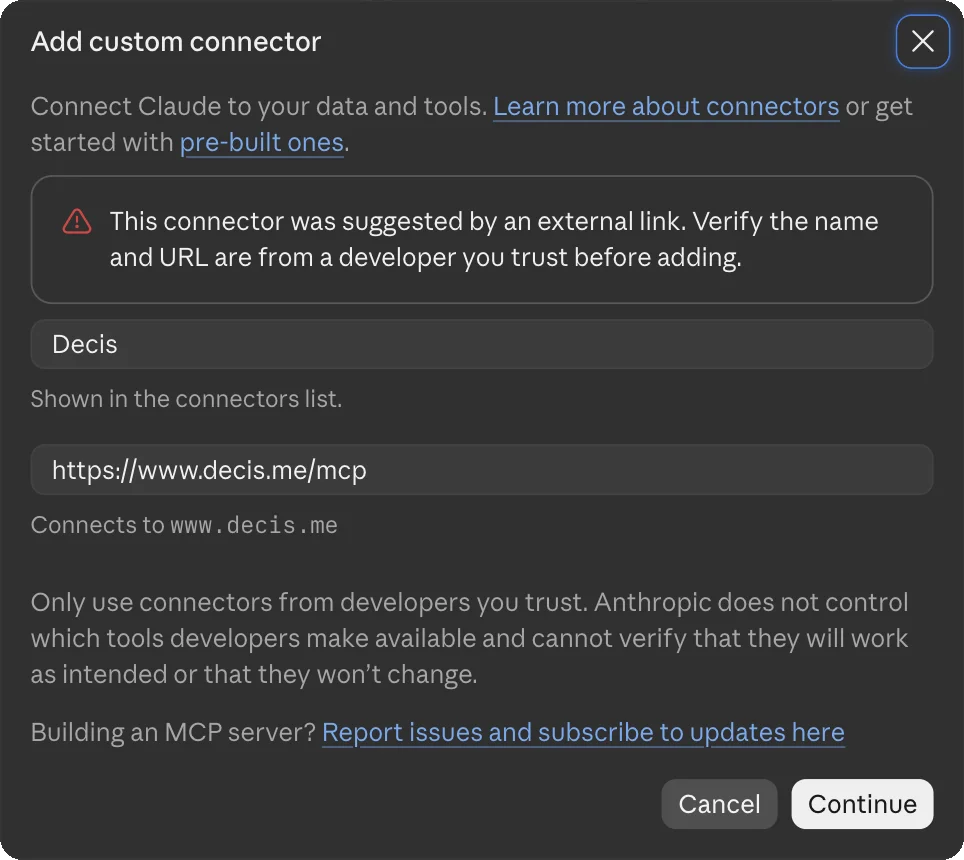
Claude opens an "Add custom connector" window with Decis and https://www.decis.me/mcp filled in, and a warning that an external link suggested it. Check the name and address and press Continue. On the next step, leave the sign-in options as they are and press Add, then press Connect, sign in to Decis, and allow access.
- In Claude, open Customize → Connectors.
- Press Add at the top right and choose "Add custom connector".

- Enter Decis as the name, paste the MCP endpoint above, and press Continue.
- Leave the sign-in options as they are and press Add, then press Connect.
- Sign in to Decis and allow access on Decis's consent screen.
- Toggle Decis tools per conversation from the "+" menu → Connectors. At first Claude asks before it runs each tool (Needs approval); to stop asking, choose Always allow for Decis in Customize → Connectors.
Claude's free plan allows one custom connector. If you already use one, remove it before adding Decis. On Team and Enterprise, an Owner adds it first under Organization settings → Connectors, then each member presses Connect.
Claude Codeterminal
Add it with one line in your terminal. --scope user makes it available in every project (use --scope project to share it with your team).
claude mcp add --transport http --scope user decis https://www.decis.me/mcpAfter adding, run /mcp inside a session to sign in, or start the browser login directly:
claude mcp login decisChatGPTweb, developer mode
- Turn on Developer mode under Settings → Apps & Connectors → Advanced settings.
- In Apps & Connectors, choose "Create" and enter a name plus the MCP endpoint above.
- Select OAuth as the authentication method and connect — a browser window opens the Decis consent screen.
- In each new conversation, enable Decis from the composer's developer-mode tool.
Pro · Plus · Business · Enterprise · Edu, web only · Decis tools are all annotated read-only, so they can run without per-call confirmation. On Business and Enterprise an admin may need to allow developer mode under workspace permissions first.
CodexCLI · IDE · desktop
One line is all it takes. Codex detects OAuth automatically and opens the browser consent screen, and the config is shared across the CLI, IDE extension, and the ChatGPT desktop app.
codex mcp add decis --url https://www.decis.me/mcpTo manage it in the config file directly, this is all you need (no auth key required).
[mcp_servers.decis]
url = "https://www.decis.me/mcp"Cursoreditor
Add the following to ~/.cursor/mcp.json (global) or .cursor/mcp.json (shared per project).
{
  "mcpServers": {
    "decis": {
      "url": "https://www.decis.me/mcp"
    }
  }
}
After saving, enable decis in the sidebar's Customize panel to open the browser OAuth consent.
VS CodeCopilot
Add it with one terminal command, or
code --add-mcp '{"name":"decis","type":"http","url":"https://www.decis.me/mcp"}'manage it in the config file — note VS Code's top-level key is servers, not mcpServers.
{
  "servers": {
    "decis": {
      "type": "http",
      "url": "https://www.decis.me/mcp"
    }
  }
}OpenClawagent
Add Decis to OpenClaw's remote MCP registry as a Streamable HTTP server using OAuth.
openclaw mcp add decis \
  --url https://www.decis.me/mcp \
  --transport streamable-http \
  --auth oauth
Then sign in to Decis and approve read-only access in your browser.
openclaw mcp login decisRun a probe to verify the connection and discover the available tools.
openclaw mcp probe decisHermesagent
Add the Decis remote MCP server to Hermes. Hermes handles OAuth discovery, PKCE, and token refresh.
mcp_servers:
  decis:
    url: "https://www.decis.me/mcp"
    auth: oauth
Restart Hermes after saving. The first Decis tool connection opens the browser sign-in and read-only consent flow.
Other MCP appStreamable HTTP · OAuth
Any client that supports remote HTTP MCP works with the standard shape.
{
  "mcpServers": {
    "decis": {
      "type": "http",
      "url": "https://www.decis.me/mcp"
    }
  }
}
Clients that only support local (stdio) servers can go through the mcp-remote proxy and get the same OAuth consent flow.
{
  "mcpServers": {
    "decis": {
      "command": "npx",
      "args": ["-y", "mcp-remote", "https://www.decis.me/mcp", "--transport", "http-only"]
    }
  }
}
Tools
Decis has eleven tools, and every one of them only reads. Each is marked read-only, and none can create, change, or delete records. In Claude, a new connection asks before each tool runs (Needs approval); you can switch Decis to Always allow in the connector settings.
get_account- Your account's language and time zone; your email only when you ask.
- Read-only
get_data_status- Which sources are connected and when they last synced.
- Read-only
list_datasets- The datasets your account has, such as sleep or meals.
- Read-only
describe_dataset- Units, date range, and source of one dataset.
- Read-only
query_datasets- Values from up to ten datasets for a date range.
- Read-only · counts as a read
get_context- A summary of your recent days.
- Read-only · counts as a read
get_today- Today's brief.
- Read-only · counts as a read
get_usage- How much of this month's allowance you have used.
- Read-only
get_decision_guide- The steps Decis uses to weigh a personal decision.
- Read-only
render_causal_dag- Draws a cause-and-effect diagram for a report. Nothing is saved.
- Read-only
search_decision_report_evidence- Searches reviewed research for a decision report.
- Read-only
Your app's prompt menu also has two prompts, decide and decision_report. Only tools that count as a read use your monthly allowance.
Data and privacy
Decis gives your AI only what a question needs. What the app does with it follows that app's own policy.
What Decis sends to your AI
- Values from the datasets a question needs, with dates, units, coverage, and source
- Your language and time zone; your email only when you ask for it
- Your data sync status and remaining allowance
What Decis keeps, and what it never receives
- The tool, result, and time of each call, and which kinds of records were read, so the Agents page can show you
- Decis never receives your conversation or your AI's answers
- Health records are sent only after your separate consent, which you can withdraw in Settings
Full details are in the Privacy policy. Decis gives information to help you understand your records; it is not medical advice.
Disconnect
You can stop an app from reading your records at any time.
In Decis
Open Agents, find the app, and choose Revoke access. Its next request is refused at once.
In your app
In Claude, open Customize → Connectors → Decis and disconnect. Other apps have a similar setting.
In the CLI
decis auth logout signs the CLI out. decis work disconnect claude-code (or another agent's name) stops sending that agent's work sessions.
Records an app already received stay with that app under its policy. Deleting your Decis account removes every connection.
Decis CLI
Read the same records from your terminal and from coding agents like Claude Code and Codex. The CLI is a signed, notarized binary.
brew install tab0inc/tap/decis-clicurl -fsSL https://decis.me/install.sh | shCommands
decis auth login- Sign in through your browser
decis today- Today's brief
decis data list- The datasets you have; then decis data query for values
decis context- Your recent days, structured
decis ask- A short answer from Decis's analyst (uses your Ask allowance)
decis work connect <agent>- Sends work-session summaries from coding agents such as Claude Code, Codex, and OpenCode to your Timeline. This is the only command that sends data to Decis, and only for agents you turn on.
decis skill- Instructions for coding agents on when and how to use the CLI
decis doctor- Checks your setup when something is wrong
Agent skill
Install the skill so Claude Code and Codex know when to use Decis. Requires Node.js.
npx -y skills add https://decis.meTroubleshooting
My app reads a different Decis account
Ask “Which Decis account is connected?” If it is the wrong one, disconnect Decis in the app and connect again. Signing in again in your browser alone does not change an app's connection.
I've used up my reads
Your AI says so with the date your allowance resets. You can see usage on the Agents page or change your plan on Pricing.
It says consent is required
Health records need your separate consent. Turn it back on in Decis Settings, then ask again.
Can I add Decis on my phone?
Adding a connector is hard in the Claude phone app. Add it once on a computer; Claude on your phone then uses the same connection.
Support
Tell us which app you connected, when it happened, and what you tried. Don't send passwords, codes, or health records.
Operated by Tab0 Inc.